

User guide
From customer interviews to a discovery map, in 5 steps
Give your AI assistant a folder of interviews. Get back a map of what your customers are trying to get done, with every quote real. Then know exactly who to call next.
- Real quotes only
- Runs on your computer
- Free and open source
By Pancrazio Auteri · Last updated
Sound familiar?
You are a product manager. You talk to customers, but you don't have two days to read 40 pages of transcripts again. You want to walk into planning with evidence, not a hunch.
- Days of re-reading transcripts and moving sticky notesA discovery map in about 10 minutes
- A chat summary with quotes nobody saidEvery quote checked word for word against its transcript
- Each round of interviews starts from zeroOne study that grows with every batch
- “Who do I call next, and what do I ask?”A printable kit: who to call, what to ask, what to listen for
How it works
- 1. Ask once, in your interviews folder.
- 2. Read the map.
- 3. Decide: is the goal right?
- 4. Call the next people.
- 5. Add the calls. Back to 2.
- Then: value themes, and feature ideation with your team.
Before you start: 3 checks
- The plugin, installedIn Claude, ChatGPT and Codex, or GitHub Copilot. Install it.
- Python 3.9 or newerCheck with
python3 --versionin a terminal. - Interviews as text
.md,.txt,.docxor.pdf. None yet? Use our 6 samples.
Your first study, step by step
Step 1 of 5, about 10 minutes
Open your folder and ask
Put your interview transcripts in one folder. Open your AI assistant there and say one sentence.
Say
Help me get started with Product Weaver.You get your discovery map, open in your browser. The assistant reads about 1.5 minutes per interview.
More about this step
Open your assistant in the folder with your interviews. In the Claude desktop app, choose that folder for the task.
It asks you one short round of questions, only those that apply: whether to share usage statistics, whether to write the study in the interviews' language when they are not in English, and whether to share the study through git.
Only recordings? The plugin reads text. Export the transcript from Zoom, Google Meet or Teams into the folder. Fewer than 3 interviews? It still works, as a first guess.
Step 2 of 5, 2 minutes
Read your map
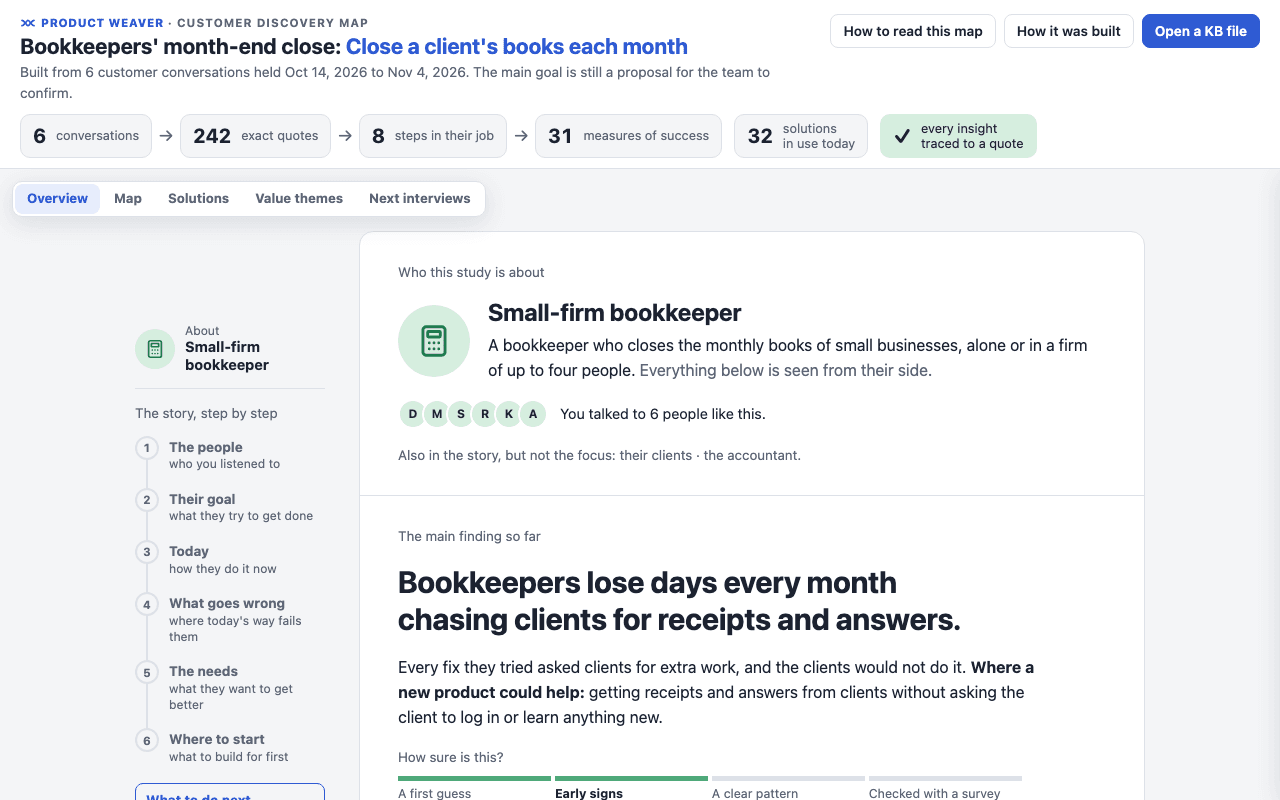
The map opens on its Overview. Read it top to bottom. It answers one question: what are these people trying to get done, and where does it go wrong?
You get who the study is about, the main finding so far, and what to do next.
More about this step
The map has 5 views, and a sixth once you make a survey. Overview tells the study as a short story. Map shows the steps of their work and what they want to get better. Solutions shows what they use today, and what they stopped using. Next interviews, Value themes and Survey come up in step 4 and the bonus steps.
Closed the map? Double-click pw-output/discovery-map.html in your folder. It works offline.
Step 3 of 5, 1 click
Confirm the goal
The assistant asks one question in the chat. Read the goal and the steps it shows, then click.
You get a study built on the right goal. Everything else rests on it.
More about this step
“Close, but change it” leaves the goal waiting. The assistant asks what to change, then shows you the new wording to approve.
In later rounds, the assistant asks the same way about other changes, such as a new step. At most 3 at a time. The rest wait on the map, under “Decisions for you”.
Why trust the findings? Every quote is checked:
Step 4 of 5, your next calls
Call the next people
The map plans your next round. In the example: talk to 3 more bookkeepers, one who works alone, one who owns a firm, and one who gets paper receipts.
Ask what they did the last time. Don't pitch your idea.
Say
Show me the interview guide.You get who to call, what to ask and what to listen for. Print it as an interview kit, one sheet per call.
More about this step
The plan aims at what is still thin: the parts of the story that rest on 1 or 2 people. The bar shows how sure the study is: a hunch, an early signal, or a clear pattern.
Find the plan any time in the map's Next interviews tab, to copy or print.
Step 5 of 5, about 1.5 minutes per call
Add the new calls
Put the new transcripts in the same folder. Then go back to step 2. Each round, the map gets surer.
Say
Add my interviews to the study.You get the same study, now surer. An open map updates itself and marks what is new.
More about this step
Talked to someone again, or got an email from them? Say so: “I talked to Dana again.” It goes under that person, not as a new one.
Files already in the study are skipped, so adding the same folder twice changes nothing.
Bonus, once the pattern is clear
Turn the needs into value themes
A study collects many needs. Value themes group them into a few your team can sort ideas into. Put every idea under one theme. Build first for the theme most people raised.
Group the needs into value themes.“Heard from 4 of 6” is a signal from interviews, not a score.
Bonus, once you have value themes
Check which needs matter most
The assistant writes a survey from the needs of one goal. For each need, a person says how much it matters and how well it is served today. For example: “Take less time to find the cause of a mismatch.”
Create the survey.Then it can estimate the ratings from your interviews. It rates each need as each person you interviewed would, and each rating rests on one of their quotes. When the interviews say nothing, the rating stays empty. The map's Survey view shows which needs look unmet.
Estimate the answers.The estimate comes from a few interviews. It is not survey answers. Show a rough prototype to 2 or 3 people to check it.
Both are made on your computer. Sending the survey to real people is not in this version.
Cheat sheet: what to say
- The first time, in your interviews folder
Help me get started with Product Weaver. - Whenever you come back
What should I do next? - After a round of calls
Add my interviews to the study. - Before your calls
Show me the interview guide. - Once the pattern is clear
Group the needs into value themes. - Once you have value themes
Create the survey. - After the survey
Estimate the answers. - For a bug report
Which version of Product Weaver do I have?
No need to learn commands. Ask in plain words: the assistant picks the right skill.
Good to know
Where are my files?
pw-output/holds what you read: the map, the review sheet and the interview guide..pw-kb/holds the study itself. Finder hides it, because its name starts with a dot.- Your own interview files are never changed.
Something went wrong
- Claude can't reach your files (Claude desktop app): keep the app open and the computer awake, then say “Try again”. Nothing is lost.
- The map doesn't update by itself: reload it once, and open the one in
pw-output/, not a copy. - Codex in your IDE: the extension does not load plugins. Use Codex CLI or the ChatGPT desktop app.
- Still stuck? Ask in the plugin's GitHub Issues.
What about privacy?
The plugin runs on your computer. It sends nothing unless you say yes to usage statistics, and even then never your interviews, names, quotes, prompts or file names. The map holds your interviewees' names and quotes, so share it with care. Details on the privacy page.
The words of the method
Product Weaver follows jobs to be done, in the style of Outcome-Driven Innovation. You never need these words, but here is how they map to the guide.
- Job executor
- who the study is about
- Core job
- the goal they are trying to get done
- Job step
- a step of their work
- Desired outcome
- a need: what they want to get better
- Current solution
- what they use today
- Value theme
- a group of needs to sort ideas into
- Underserved outcome
- an unmet need: it matters a lot and is served badly today
More in jobs to be done, explained.
Outcome-Driven Innovation® is a registered trademark of Strategyn, LLC. Product Weaver follows the method as published; it is not made or endorsed by Strategyn.
Try it now, on 6 sample interviews
Download the samples, open your assistant in that folder and say the first sentence. Your first map is about 10 minutes away.