 Product Weaver
Example study
Six bookkeepers, one discovery map
Six bookkeepers talk about closing their clients' books each month. Hidden in what they say is a pattern: they lose days every month chasing clients for receipts, and every fix they tried asked those clients for more work. The Product Weaver plugin found it and put it on one map, with the 31 things they want to go better, the 37 tools and workarounds they rely on or gave up on, and where a new product should start. Each finding links to the exact words behind it. We ran the plugin in an AI assistant, just as you would, and changed nothing it wrote. Open the map, click anything, and see who said it. Then picture this map built from your own customer calls.
Last updated . The people, their clients and their words are invented.
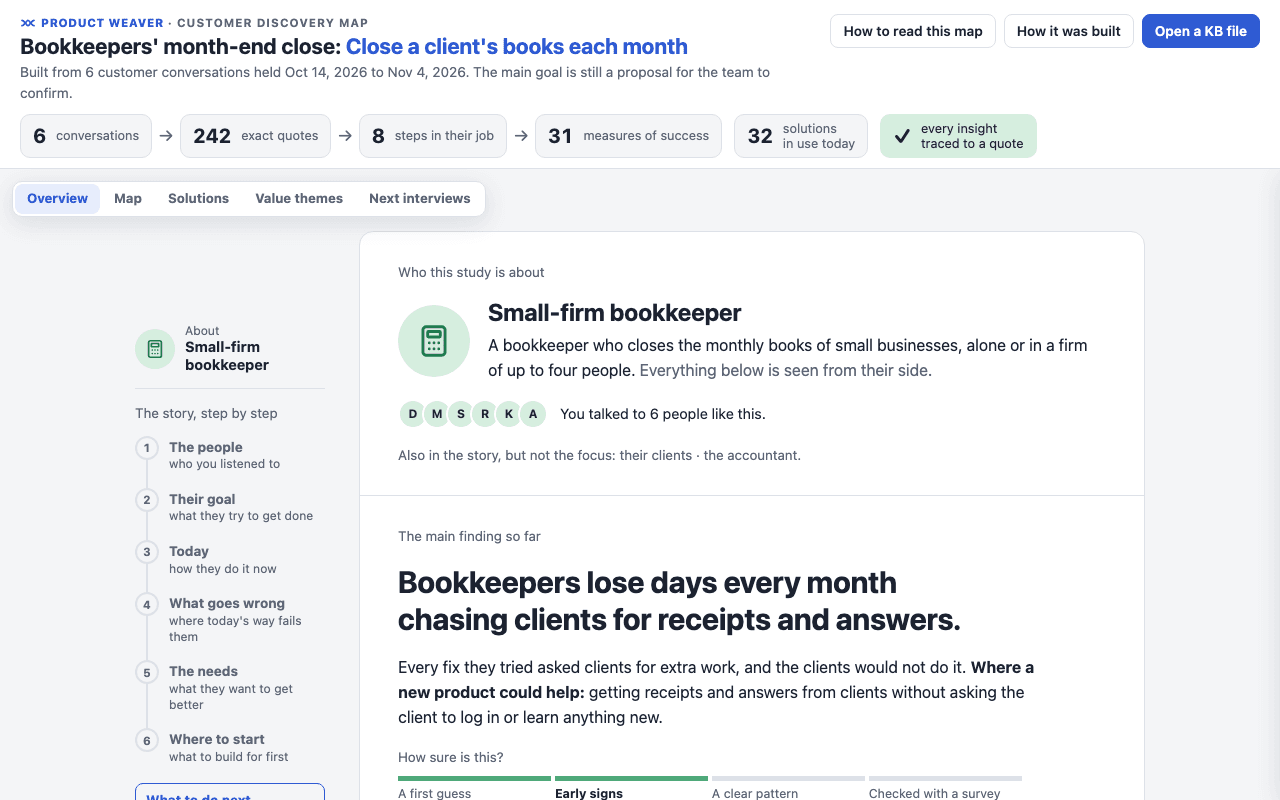
- 6conversations
- 1core job
- 8steps in the job
- 31desired outcomes
- 37current solutions
- 8value themes
- 242exact quotes, each checked
What went in
Six transcripts of about 1,000 words each, one per interview, as Markdown files. Each starts with the person's role and setup.
- Interview 1, Dana: Freelance bookkeeper who closes the books of 25 small businesses alone.
- Interview 2, Marcus: Owner of a four-person bookkeeping firm who still closes the largest clients himself.
- Interview 3, Sofia: Partner in a two-person bookkeeping firm who closes 21 small-business clients herself.
- Interview 4, Ruth: Semi-retired part-time bookkeeper with nine local clients who works mostly on paper.
- Interview 5, Kenji: Freelance bookkeeper for 30 online shops and agencies who automates most of the coding.
- Interview 6, Amara: Part-time bookkeeper in a three-person firm who owns the monthly close of 20 clients.
The request was one sentence:
“Process the discovery interviews in the Interviews folder.”
One sentence, followed through
In interview 3, Sofia is asked what happens at the end of the month:
“Honestly? I spend the first week of every month chasing clients for receipts. I keep a spreadsheet of who still owes me what.”
That answer becomes two entries in the knowledge base:
- a quote on the desired outcome Minimize the time it takes to get every receipt from a client (A.2.1), at the step Collect the client's documents. Five of the six people raised it;
- a current solution at that step, the spreadsheet of missing documents.
A few lines later she says “We tried a client portal. Nobody logged in.” That goes in as a solution she stopped using, with the reason. The plugin checked each of these quotes against her transcript, word for word, before it merged them.
The job and its map
The six people share one core job: Close a client's books each month. The plugin proposes it, and the review sheet asks the team to confirm it. Its steps sit on the eight stages of a job map.
| Stage | Step | People |
|---|---|---|
| Define | Decide what this month's close needs (A.1) | 4 of 6 |
| Locate | Collect the client's documents (A.2) | 6 of 6 |
| Prepare | Sort the documents by account (A.3) | 5 of 6 |
| Confirm | Check that the documents are complete (A.4) | 5 of 6 |
| Execute | Record the transactions (A.5) | 6 of 6 |
| Monitor | Reconcile the books with the bank (A.6) | 6 of 6 |
| Modify | Correct the entries that do not match (A.7) | 6 of 6 |
| Conclude | Report the month to the client (A.8) | 6 of 6 |
What they want to get better
31 desired outcomes, each with the quotes behind it. These are some that the most people raised.
- Minimize the time it takes to find the cause of a mismatch (A.7.1, 6 of 6)
- “In September the café was off by three hundred and twelve dollars and I could not find it. I spent most of an afternoon on it.” (Dana)
- Minimize the time it takes to explain a change in the numbers to a client (A.8.1, 6 of 6)
- “It took me twenty minutes to explain that it's not a loss, it's just timing.” (Dana)
- Minimize the time it takes to get every receipt from a client (A.2.1, 5 of 6)
- “Easily a third of my month is chasing people for receipts that are sitting in their car.” (Dana)
- Minimize the likelihood of closing the month with a document missing (A.4.1, 3 of 6)
- “In June we closed one of the restaurants and a big equipment invoice wasn't there. Nobody noticed.” (Sofia)
The counts come from interviews. They are a signal, not a survey score: only a survey can say how much a need matters across a market.
What they use today, and what they gave up
37 solutions in 11 groups: QuickBooks and Xero, email reminders, an assistant who chases documents, a spreadsheet of missing documents, a divide-by-nine routine to find mismatches, a three-minute screen recording to explain the month. Six were given up by someone, each with the reason:
- Client portal
- “We tried a client portal. Nobody logged in.” (Sofia)
- Receipt photo app
- “He used it for about three weeks. Then he stopped. He said it took longer to photograph a receipt than to lose it.” (Ruth, about a client)
- Late fee for late documents
- “We charged a late fee for a while. It made them angry and it didn't make them faster. We dropped it after two months.” (Marcus)
- Text messages to clients
- “They do answer, but then the receipts arrive in my texts and I lose them in there. So I stopped.” (Dana)
- Phone calls, for answers on unknown transactions
- “On the phone they say “let me check and call you back”, and then they never call back.” (Amara)
- Emailed standard reports
- “We used to just email the standard reports out of the software.” (Marcus)
Value themes
Asked to “group the outcomes into value themes”, the plugin sorted all 31 outcomes into eight needs in the bookkeepers' own voice.
| Theme | The need | People |
|---|---|---|
| Get what I need from clients | Help me get documents and answers from clients without chasing them | 6 of 6 |
| See where every close stands | Help me see at a glance what each client's close still needs | 5 of 6 |
| Close with nothing left out | Help me close each month knowing nothing was left out | 5 of 6 |
| Hand the accountant a clean year | Help me reach year-end with nothing left for the accountant to find | 5 of 6 |
| Handle each document once | Help me get each document into the books without handling it twice | 5 of 6 |
| Code every entry right first time | Help me record every transaction where it belongs the first time | 4 of 6 |
| Find what is wrong fast | Help me find why the books do not match the bank, fast | 6 of 6 |
| Make the numbers make sense | Help me give clients the why behind their numbers before they ask | 6 of 6 |
The bottom line, and what to do next
The Overview starts with who the study is about: a small-firm bookkeeper, “a bookkeeper who closes the monthly books of small businesses, alone or in a firm of up to four people.” Their clients and the accountant appear in the story, but it is not about them. Then comes the main finding:
“Bookkeepers lose days every month chasing clients for receipts and answers.”
The Overview explains why: “Every fix they tried asked clients for extra work, and the clients would not do it.” It names what to build for first, getting receipts and answers from clients without chasing them, and gives three next steps:
- Keep learning: Do this now. Talk to two more bookkeepers: one whose assistant chases clients, and one whose clients use a shared folder.
- Prototype: Ready to sketch. Sketch one thing: a way for clients to send receipts with no login and no new app.
- Go to market: Too early to sell. Note which bookkeepers offer to try it, and with how many clients.
After six conversations the map rates the findings as early signs. You can trust a pattern once you have about eight conversations and new ones stop adding needs.
The map's Next interviews view plans those two conversations: who to find, what to ask, and what each answer would back up. Three needs behind the main finding rest on two people each, so they come first.
The files
- discovery-map.html: the interactive map, one file that works offline.
- review.md: the review sheet, with the one decision that waits for the team (confirm the core job).
- interview-guide.md: the plan for the next interviews, ready to take into the calls.
- pw-kb.json: the knowledge base itself.
New to the terms? Read jobs to be done, explained, or the interview analysis guide for the method step by step.
Run it on your own interviews
productweaver/productweaver-pluginNo terminal needed. In the Claude desktop app, open Customize, then Plugins. Choose Add marketplace, paste this line and install productweaver. Then, in Cowork, choose a folder and say: Help me get started with Product Weaver.
claude plugin install productweaver --marketplace productweaver/productweaver-pluginRun it in a terminal. Needs Claude Code 2.1.292 or later.
codex plugin marketplace add productweaver/productweaver-pluginThen open /plugins in Codex and install productweaver.
copilot plugin marketplace add productweaver/productweaver-plugin
copilot plugin install productweaver@productweaver-plugin
Run both lines in a terminal with the Copilot CLI.